
Introduction
Starting a career in modern software operations can easily feel overwhelming. The field includes dozens of tools, cloud services, deployment methods, and system designs. Many beginners make the mistake of trying to learn every new technology at the same time, which quickly leads to confusion and frustration.
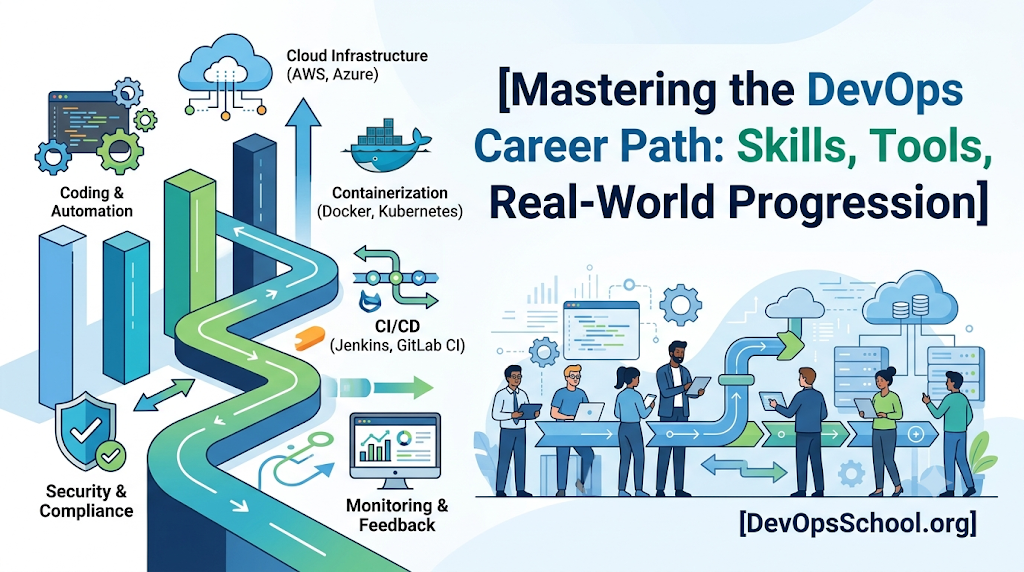
A much better approach is to follow a clear, step-by-step path. By mastering basic concepts first, understanding how tools solve real daily problems, and picking a clear area of focus, you can build a steady and successful career. This guide explains how to design a practical DevOps roadmap and build a clear DevOps learning path for long-term growth.
Start With Engineering Fundamentals
Before you try to automate cloud systems or run application clusters, you must understand how basic computers and networks operate. Skipping basic system skills is the main reason why many people struggle with advanced automation later.
Linux and Basic System Administration
Most enterprise servers and cloud applications run on Linux operating systems. Learning how to navigate the terminal, manage files, set permissions, and control background services is essential. You should feel comfortable opening a command window, reading system log files, and checking server memory or processor usage.
Networking Basics
Automation cannot repair a system that cannot communicate over the network. A basic understanding of computer networking helps you set up secure connections and fix broken links between systems. Key topics include:
- How data travels across local networks and the internet
- IP addresses, subnets, and routing rules
- Common protocols like HTTP, HTTPS, DNS, and SSH
- Basic firewalls, routers, and load balancers
Version Control and Simple Scripting
Git is the standard tool for tracking changes in code and setup files. You need to learn how to save your work, create separate working branches, merge updates, and share code with team members. Learning a basic scripting language—such as Bash for terminal commands or Python for simple programs—allows you to replace manual, repetitive work with automatic tasks.
Build the Core DevOps Skill Set
After learning system and network basics, you can start building core delivery skills. A well-designed DevOps engineer roadmap focuses on practical capabilities rather than a huge list of tools.
+-----------------------------------------------------------------------------------+
|                            PRACTICAL SKILL PROGRESSION                            |
+-----------------------------------------------------------------------------------+
|  1. Basics         --> Linux, Networking, Git, Shell Scripting                    |
|  2. Delivery       --> Continuous Integration, Automated Deployments             |
|  3. Isolation      --> App Containers, Packaging, Environment Setup               |
|  4. Cloud & Code   --> Cloud Servers, Infrastructure as Code                      |
|  5. Health         --> System Monitoring, Log Tracking, Reliability               |
|  6. Platforms      --> Self-Service Portals, Internal Developer Tools             |
+-----------------------------------------------------------------------------------+
Automation and Continuous Delivery
Continuous Integration and Continuous Deployment (CI/CD) form the main engine of modern software delivery. Your goal is to learn how application code moves automatically from a developer’s computer to live production servers. Focus on understanding how code is compiled, tested, packaged, and deployed without manual human intervention.
Containers and Cloud Setup
Containers solve software delivery issues by packaging applications together with everything they need to run. Learn how to build, clean up, and run simple application containers. As applications grow larger, managing single containers manually becomes difficult. This requires automated cloud tools and managers to handle scaling and traffic automatically.
Learn Tools Through Practical Problems
You should always select software tools based on the specific problem you need to solve. Looking at DevOps tools as practical solutions keeps you focused on real work instead of unnecessary details.
| Engineering Category | Real Problem Solved | Popular Tool Examples |
| Source Control | Saving code history and collaborating safely | Git, GitHub, GitLab |
| CI/CD Platforms | Automatically testing and releasing software | Jenkins, GitHub Actions, GitLab CI |
| Container Tools | Packaging software so it runs anywhere | Docker, Podman |
| Container Managers | Running and scaling hundreds of containers | Kubernetes |
| Infrastructure as Code | Creating cloud servers using simple text files | Terraform, OpenTofu |
| Config Tools | Keeping server settings uniform and correct | Ansible |
| Monitoring Tools | Watching system speed and reporting errors | Prometheus, Grafana |
How to Compare DevOps Tools
Because there are many similar tools available today, performing a thoughtful DevOps tools comparison is an important skill for growing engineers. Instead of picking a single winner, compare tools using simple criteria:
- Main Goal: Does this tool solve your current problem without making your setup overly complicated?
- Community Help: Is the tool backed by an active community or solid company? Good guides and helpful forums save hours of effort.
- Integrations: How easily does the tool connect with your existing cloud accounts, security checks, and chat apps?
- Ease of Use: Can your team learn and use this tool easily, or does it require months of deep training?
- Declarative Style: Can you simply write down what you want the end result to look like, rather than writing long step-by-step scripts?
Move Toward Reliability and Operations
Once software is running live, keeping it fast, stable, and accessible becomes the main priority. This is where site reliability practices become essential.
When following an SRE roadmap, your attention moves toward server uptime, quick performance, and fixing system breakdowns. Site Reliability Engineering (SRE) uses software engineering methods to solve traditional operational and stability problems. Key areas include:
- Clear Metrics and Targets: Setting clear goals for system speed and uptime so you can measure actual user experience.
- Acceptable Downtime Limits: Deciding how much small downtime is acceptable so teams can release new features without fear.
- System Visibility: Collecting health metrics, application logs, and system events so you can find and repair bugs quickly.
- Fixing Outages: Building standard step-by-step guides for emergencies and holding calm team reviews after outages to prevent repeat issues.
Explore Platform Engineering
In growing companies, answering everyday support requests from dozens of software developers can create severe delays. Platform Engineering solves this issue by creating internal platforms for software teams.
Following a Platform Engineering roadmap means moving from setting up servers manually to building self-service tools for developers. Platform engineers build simple portals, standard code templates, and automated workflows so developers can deploy their own apps safely without needing to become cloud experts.
This career path is a natural next step for engineers who already understand cloud servers, containers, and deployment automation.
Understand Certifications Strategically
Certifications are a good way to review technical topics in order, learn new cloud tools, or meet company job requirements. However, passing tests should never take the place of real hands-on work.
When reviewing a DevOps certification roadmap, choose exams based on your current practical goals:
- Beginner Cloud Exams: Foundational tests help you learn basic cloud terms, tools, and billing concepts.
- Intermediate Architecture Exams: Associate level tests check your ability to design secure, basic cloud networks.
- Hands-on Performance Exams: Practical exams—where you solve live problems in a real terminal—carry strong value because they test actual skill rather than simple memory.
Avoid collecting certificates just to build a long resume. Always pair every test you take with a real working project that shows what you can do.
Build Projects Before Chasing Every Tool
The fastest way to lock in new skills is by building complete projects from start to finish. Instead of following tiny isolated exercises, build one connected project that mimics a real company setup.
Recommended Multi-Step Project
- Application and Container: Take a simple web program, write a clean container file for it, and run it locally on your computer.
- Cloud Server Setup: Use Terraform to automatically create a virtual network and small cloud cluster on a cloud platform like AWS or Google Cloud.
- Automated Pipeline: Set up an automated workflow that runs tests, builds your application container, checks it for security flaws, and uploads it safely.
- Automated Deployment: Use a deployment tool to automatically sync your code updates from your online repository to your cloud cluster.
- System Dashboard: Set up simple health metrics and a visual display board to watch system memory, web traffic, and server errors.
Write down your project design, tools used, and steps taken in a clean read-me file attached to your public project folder.
Connect Learning With Career Preparation
Finding good DevOps jobs requires showing clear proof of your practical capabilities. Team managers look for real problem-solving skill, clear thinking, and good team communication.
To prepare effectively for job interviews:
- Keep clean, well-organized code repositories showing your server scripts and deployment pipelines.
- Practice simple system design, focusing on how to make applications reliable and redundant.
- Be ready to explain how you fixed real errors, read system logs, or improved slow deployment steps.
- Work on clear written and spoken communication, as operational roles require daily teamwork with developers and management.
How DevOpsSchool.org Can Support Your Journey
Learning a broad field is much easier with structured educational guides. DevOpsSchool.org operates as a free and open software engineering learning and career platform designed to help developers and operational staff build practical technology skills.
The platform provides structured 90-day learning paths that divide large topics into clear weekly goals. Whether you are researching technical concepts, comparing tool choices, or preparing for cloud exams, DevOpsSchool.org offers access to practical guides, technology lists, interview practice guides, and career resources across DevOps, SRE, and Platform Engineering.
Practical DevOps Learning Framework
To keep moving forward without getting lost, follow this straightforward step-by-step order:
- Fundamentals: Learn Linux terminal commands, basic computer networks, Git version control, and simple shell scripts.
- Automation & Pipelines: Learn how to build automated pipelines that test and package application code automatically.
- Containers & Cloud: Master application containers and learn how basic cloud servers, storage, and networks work together.
- Management & Code Setup: Learn container managers like Kubernetes along with file-based server tools like Terraform.
- Monitoring & Security: Track application health with basic metric dashboards and add automated security checks to your pipelines.
- Specialization: Focus on SRE stability practices or Platform Engineering internal developer tools based on your personal goals.
Common Mistakes to Avoid
- Learning Too Many Tools Once: Focus on learning one solid tool per category before trying alternative software.
- Skipping Computer Basics: Trying to manage complex cloud setups without understanding Linux or networking makes troubleshooting errors very difficult.
- Watching Tutorials Without Building: Following simple video guides without building your own custom projects gives a false feeling of progress.
- Expecting Certificates to Guarantee Jobs: Certificates help show interest, but real project work and problem-solving skills earn actual job offers.
- Ignoring Code Cleanup and Notes: Writing neat scripts, saving code commits cleanly, and writing clear project guides are essential daily skills.
FAQs
How long does it take to learn DevOps basics?
For someone with basic computer or programming experience, building useful practical skills usually takes 6 to 9 months of steady practice. Complete beginners may need 9 to 12 months to comfortably learn system basics, cloud tools, and pipeline automation.
Should I learn cloud basics before Kubernetes?
Yes. Kubernetes depends heavily on basic cloud elements like virtual networks, storage drives, and access rules. Understanding basic cloud setup first makes learning Kubernetes much simpler.
Are certificates required to get a job in this field?
No, certificates are not required, but they can help beginners show dedication. Demonstrating practical skill through real code projects, online repositories, and clear system knowledge is far more important to hiring teams.
What is the difference between DevOps, SRE, and Platform Engineering?
DevOps is a general mindset focused on removing barriers between development and operations teams. Site Reliability Engineering (SRE) uses programming techniques to focus specifically on server uptime and system stability. Platform Engineering focuses on building easy self-service portals and workflows for internal developers.
Conclusion
Building a lasting operational career requires steady effort, practical practice, and continuous learning. Instead of trying to master every tool listed online, focus on building strong Linux, networking, and scripting fundamentals first. Step by step, master continuous pipelines, application containers, cloud setups, and system monitoring through practical projects.
As you build your knowledge, platforms like DevOpsSchool.org provide free, structured learning paths, tool lists, and certification research guides to aid your path. Focus on fixing real operational problems, explain your work clearly, and follow a learning sequence that fits your long-term career goals.

